LightCurveLynx - A fast and nimble package for realistic time-domain light curve simulations
Time-Domain Forward-Modeling for the Rubin Era
Realistic light curve simulations are essential to many time-domain problems. Simulations are needed to evaluate observing strategy, characterize biases, and test pipelines. LightCurveLynx aims to provide a flexible, scalable, and user-friendly time-domain simulation software with realistic effects and survey strategies.
For an introduction to the package see our recent [LINCC Frameworks Tech Talk on YouTube](https://www.youtube.com/watch?reload=9&v=H0HqXD2iS94).
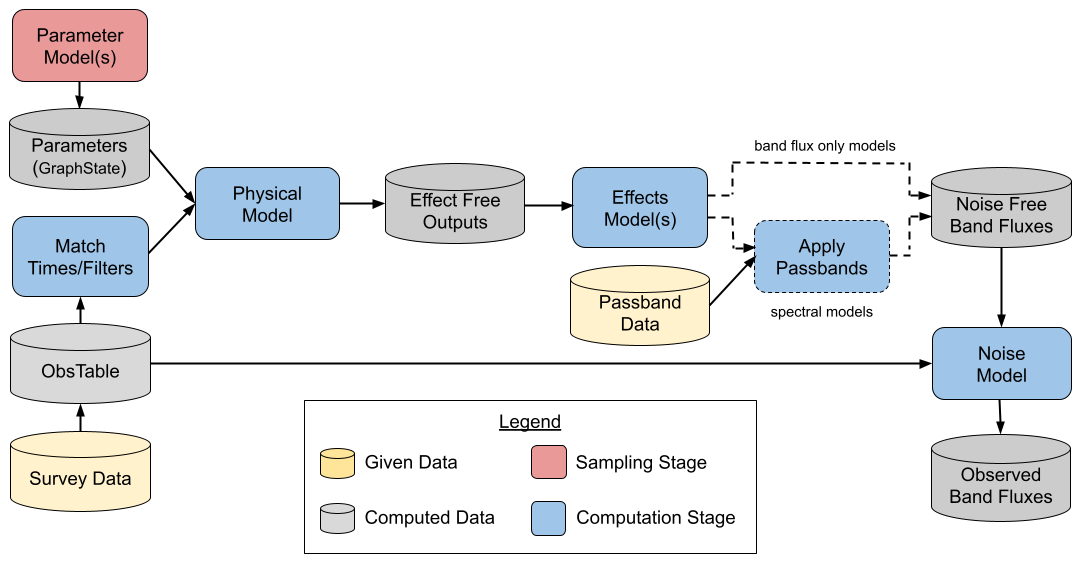
The main simulation components in LightCurveLynx include:
A statistical simulation step where the hyperparameters of the model are drawn from one or more prior distributions. This can include existing packages such as pzflow or custom distributions.
A model that defines the properties of the time-domain light source, which can also include a host-galaxy model, and is used to generate the noise-free light curves.
ObsTablecontains the survey information such as survey strategy and observing conditions. It is used to specify the observing times and bands. For more information see the survey data documentation page.A set of predefined effects, such as dust extinction and detector noise, are applied to the noise-free light curves to produce realistic light curves.
The
PassbandGroupcontains the filter information of the telescope and is used to calculate the fluxes in each band.
LightCurveLynx can generate numerous random realizations of the parameters for the physical model
(SEDModel or BandfluxModel), and then apply the effects to these realizations. The ObsTable
component is used to produce realistic light curves using the above components. See the
simulations page for a more detailed description of the process.
In addition to built-in and user-defined models, LightCurveLynx is designed to build off the many excellent existing modeling packages. Wrappers are provided for popular packages including:
BAGLE - a package for gravitational microlensing events modelling (example).
bayesn - A package for hierarchical modeling of a Type Ia supernova (example).
PyLIMA - A package for flexible micro-lensing event simulations (example).
redback - A package for simulating and fitting a range of cosmological phenomena (example).
sncosmo - A package for simulating supernovae.
synphot - A package for simulating photometric observations (example).
VBMicrolensing - A package for gravitational microlensing events using the advanced contour integration method (example).
LightCurveLynx also allows users to load and sample pre-generated light curves, such as the
LCLIB (example) and
SIMSED (example) formats used by SNANA.
For an overview of the package, we recommend starting with the notebooks in the “Getting Started” section of the notebooks page. The glossary provides definitions of key terms, such as GraphState, Node, Parameter, ParameterizedNode, BasePhysicalModel, BandfluxModel, and SEDModel.
The full source code is available on GitHub.
If you are interested in installing from source, or contributing to the package, see the contribution guide. For additional questions, see the FAQ page or the getting help page.
Installation
You can install LightCurveLynx from PyPI with pip or from conda-forge with conda. We recommend using a dedicated environment.
# Create a virtual environment
python3 -m venv ~/envs/lightcurvelynx
# Activate it
source ~/envs/lightcurvelynx/bin/activate
# Install from PyPI
python -m pip install lightcurvelynx
# Create a virtual environment
conda create -p lightcurvelynx python=3.12
# Activate it
conda activate lightcurvelynx
# Install from conda-forge channel
conda install conda-forge::lightcurvelynx
Since LightCurveLynx relies on a large number of existing packages, not all of the packages are installed in the default configuration. For example the microlensing (VBMicrolensing), pzflow (pzflow), and sncosmo (sncosmo) packages are not included by default. You can install most of the optional depenencies with the “all” extra:
python -m pip install 'lightcurvelynx[all]'
conda install conda-forge::lightcurvelynx conda-forge::pzflow conda-forge::sncosmo
If you need a package that is not installed as part of the default or all configurations, LightCurveLynx will provide a message with the information on which packages you need to install and how to install them.
Example Usage
See our selection of tutorial notebooks for usage examples. We recommend starting with the introduction notebook to get a high level overview.
Running LightCurveLynx in a Jupyter Notebook
Note that to run the LightCurveLynx within a notebook, your notebook kernel will need to have LightCurveLynx installed. If you are using JupyterLab, you can install the kernel with the following commands (using the Terminal program):
>> python3 -m pip install ipykernel
>> python3 -m ipykernel install --user --name=lightcurvelynx
You will need to restart your notebook server to see the new kernel.
Updating from TDAstro
This package was recently renamed from TDAstro to LightCurveLynx. A few changes will be needed to update your code:
If you use the package as a dependency (e.g. in pyproject.toml), update your requirements to use lightcurvelynx instead of tdastro.
Update your import statements from import tdastro to import lightcurvelynx.
If you have cloned the repository, update your remote URL to https://github.com/lincc-frameworks/lightcurvelynx.
If you have installed from PyPI or conda-forge, uninstall tdastro and install lightcurvelynx instead.
If you run into any problems or have any questions, please reach out to the team. We are happy to help!
Advisories
This project is under active development and may see API changes.
Users should always carefully validate the science outputs for their use case. Please reach out to the team if you find any problems.
Acknowledgements
This project is supported by Schmidt Sciences.